Every month, around the 28th, a familiar scene plays out in offices running partner programs. A partner manager stares at two screens. One shows HubSpot full of closed won deals. The other shows a spreadsheet of partner commissions that seems to exist in a parallel universe. Three deals are missing from the calculation. One partner got paid twice last quarter, and nobody can explain why.
This is the quiet tax of a partner program held together by hand. It is the friction that slowly drives partners away. Most companies pick the integration that costs them partners over time. They solve the easy job and ignore the expensive one. By the end of this guide, you will know which job is actually draining your team.
The Native Capabilities and Their Limits
You can manage partners inside HubSpot, but only up to a certain point. HubSpot was built for customers, not for channel partners. You can create custom objects for partners. You can build pipelines for partner sourced deals and tag contacts by partner type. HubSpot even runs its own Solutions Partner Program on similar logic.
This covers the data side of things. It does not cover two harder jobs: a self serve partner experience and accurate commission payouts. In our experience, teams hit this wall around partner number fifteen. The manual workarounds that felt clever at five partners start to crack under the weight of growth. For those looking to scale their digital marketing efforts, learning the right systems is crucial. Our affiliate marketing course can teach you how to build and manage these structures effectively, blending technical know how with strategic insight.
Understanding the Three Separate Integration Jobs
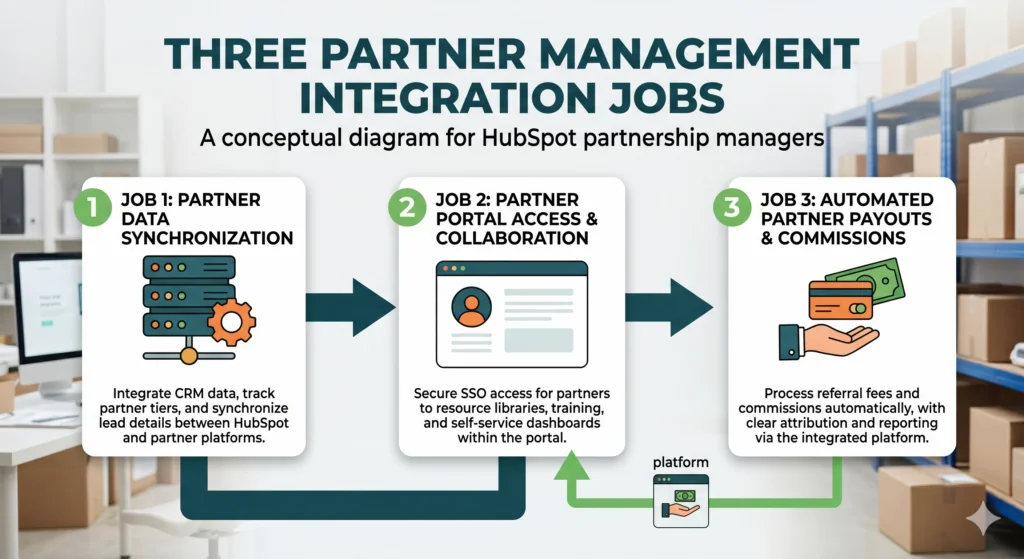
A HubSpot partner management integration is really three separate jobs, not one single decision. Teams fail when they treat it as a single switch to flip. The word integration sounds like one project. It is not. There are three distinct jobs. There is the data job, keeping partner and deal records clean inside your CRM. There is the portal job, creating a front door where partners can register leads and check their status. And there is the money job, calculating and paying commissions without errors.
What we notice most often is that teams solve job one, fake job two, and ignore job three until a partner calls to complain about a late payment. Each job points to a different type of tool. Match the job to the right tool, and the whole program runs quieter. Below are the three paths with honest trade offs for each one.
Path One: Building a Native Portal with HubSpot CMS
The native path means building your partner portal directly on HubSpot CMS using membership pages and CRM data. You stay inside one platform with no extra vendor. This appeals to teams that already pay for HubSpot CMS. Your partner data and your portal share one source of truth. You create gated CMS pages tied to partner contact records. Partners log in to see their deals, assets, and status. HubSpot workflows handle lead routing and notifications. Custom objects store partner tiers and program details.
For a small program with simple needs, this can run well. Your developer wires it once and it holds. But custom builds get expensive fast. Industry estimates put serious HubSpot portal builds at twenty to fifty thousand dollars in setup cost. Commission logic is the real trap here. HubSpot has no native engine to calculate tiered or recurring partner payouts. So teams export deals to a spreadsheet and do the math by hand. That spreadsheet is exactly the screen from the start of this article, the one that refuses to match reality.
Path Two: Adding a Dedicated PRM Application
The dedicated PRM path adds a purpose built partner platform that syncs both ways with HubSpot. Tools designed for this act as the partner front end while HubSpot serves as the system of record. This path skips the custom build. You get a partner portal in days, not months. The PRM connects to your HubSpot account and mirrors deals, contacts, and companies. Partners register leads in the PRM without ever logging into HubSpot. Activity pushes back to your HubSpot timeline automatically. Your sales team keeps working inside the CRM they already know.
PRM pricing climbs with scale. Plans can range from a few hundred dollars a month to tens of thousands of dollars a year. Many PRM tools center on resellers and tech partners tracked in ecosystem platforms. If your program is affiliate or referral heavy, the commission engine may feel thin. You still need to ask the money question. A pretty portal does not guarantee clean, automated payouts. This is where learning from industry experts like Nehme Sbeiti can help, as their website design, search engine optimization, and digital marketing services often bridge the gap between having a portal and having a profitable system.
Path Three: Automating Partner Payouts with an Affiliate Layer
The affiliate automation path connects a commission platform to HubSpot to track referrals and automatically pay partners. It solves the money job that most builds leave half done. This path matters when commissions are the messy part. Referral partners, affiliates, and ambassadors all need reliable, rules based payouts. When a deal closes in HubSpot, that event can sync to a commission tool to credit the right partner. You set commission rules once. The platform supports recurring commissions for SaaS, lifetime rates for VIP partners, and fixed or percentage payouts for ecommerce.
Different partners can sit in different tiers, including a zero commission tier for internal accounts. Payouts run under the rules, not in a month end spreadsheet. This tool is not a full reseller PRM. It will not replace a deep channel portal for complex co selling motions. It shines on the commission and referral side, not on heavy collaboration with resellers. For SaaS and ecommerce referral programs, that focus is the point.
How to Choose Your HubSpot Partner Integration
Choose your path by naming which of the three jobs hurts most right now. The right HubSpot partner management integration depends on your partner type and your biggest source of friction. Run your situation through a short test. If you have mostly resellers and co selling partners, a dedicated PRM app becomes the backbone of your portal. If you have mostly affiliates and referrals, an affiliate layer solves the pain of payouts. If you have a tiny program with a strong dev team and simple rules, a native HubSpot CMS build can hold for now. If you are bleeding time on payouts, fix the money job first, whatever your partner type.
Many growing teams end up combining paths. They keep HubSpot as the record, add a collaboration portal, and use an affiliate tool for clean payouts. That combination is normal, not a failure of planning. The mistake is pretending one tool does all three jobs well.
Setting Up Commission Tracking and Payouts
Commission tracking in HubSpot requires an external engine because HubSpot lacks a native payout calculator. This is the single most common gap in a HubSpot partner program. Picture the manual version. A spreadsheet pulls closed won deals. Someone applies rates by hand. Finance pays out from that file. One typo shifts a partner payout. One missed deal erodes partner trust. One double payment burns real cash. Partners notice late or wrong payments fast, and payout accuracy is a known driver of partner churn.
Automating this job removes human error. Rules calculate each commission. Reporting ties every payout back to a tracked referral. The result is boring in the best way. Partners get paid the right amount on time, without anyone having to open a spreadsheet at midnight.
Common Questions About HubSpot Partner Management
Can you manage partners in HubSpot? Yes, using custom objects, partner pipelines, and tagged contacts. This covers partner data and basic deal tracking well. It does not natively support a self serve partner portal or automated commission payouts. Does HubSpot have a built in PRM? No, it does not ship a dedicated partner relationship management module. It gives you CRM building blocks to approximate one. What is the difference between PRM and CRM software? CRM manages customer relationships and direct sales pipelines. PRM manages relationships with partners who sell or refer on your behalf. A HubSpot partner management integration connects the two.
A Final Perspective on Your Integration
Here is the open loop closed. The integration that costs you partners is the one that solves the easy job and ignores the hard job. Name your three jobs first: data, portal, payouts. Then match each to the tool built for it. HubSpot holds the data. A PRM or CMS build serves the portal. An affiliate platform keeps payouts accurate and automatic. Pick by your real pain, not by the loudest demo. Do that, and month end becomes quiet again. The future of partner management lies not in chasing every shiny new tool, but in honestly matching each piece of the puzzle to its proper place.