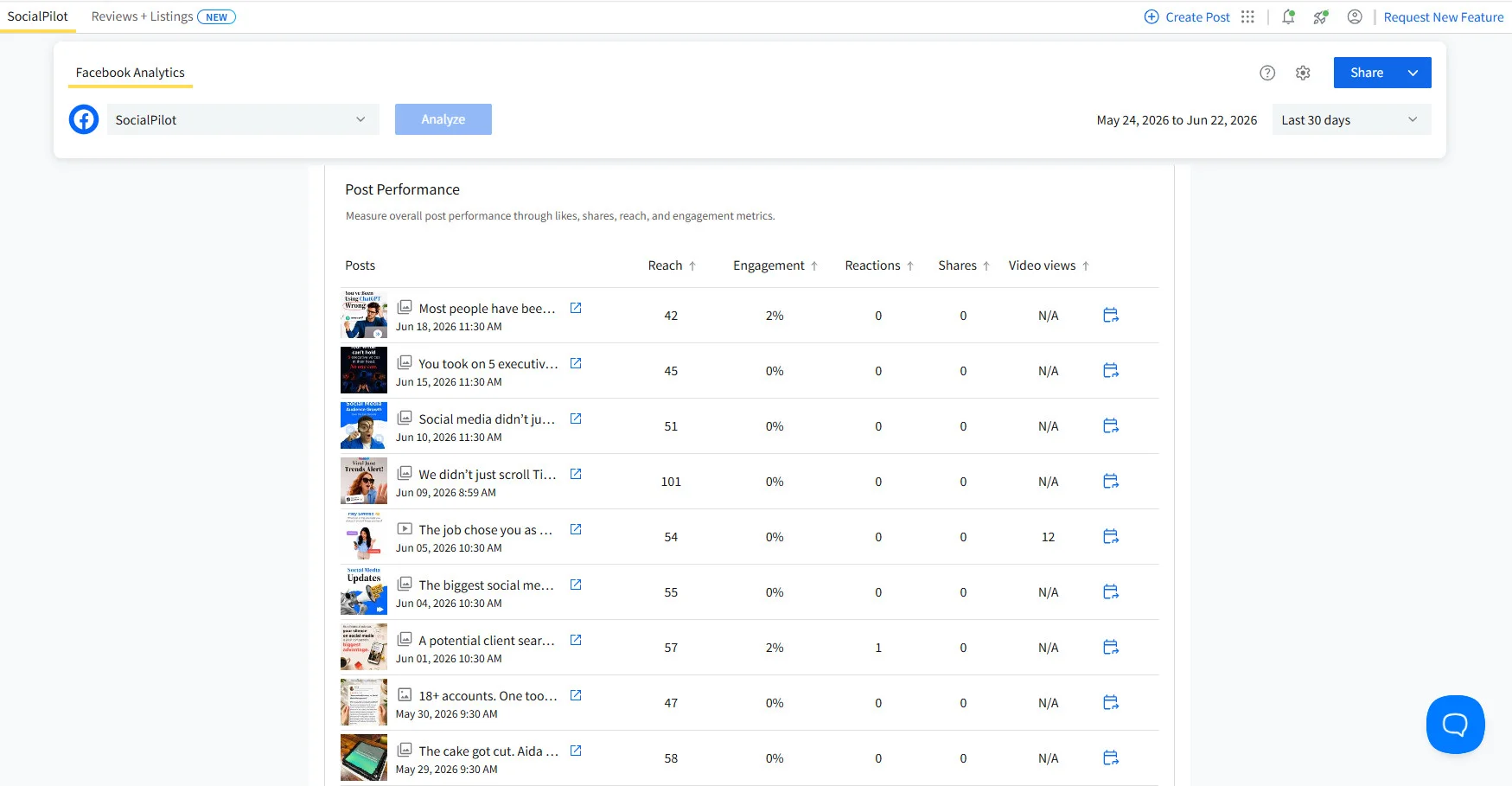
Your analytics dashboard is a masterful storyteller of the past. It can tell you exactly which posts soared and which ones crashed last month. Yet, it remains stubbornly silent on what you should actually post next month. That gap, between raw performance data and a structured, actionable content plan, is where many marketing agencies get stuck. They either spend hours guessing or they skip the analysis entirely and mindlessly repeat the same tired content pillars on autopilot.
This article presents a lean, nine-step monthly workflow designed to bridge that gap. We will use an AI assistant to transform your social media analytics into a data-backed 30-day calendar. The process is built for agencies and freelance managers who already have a wealth of performance data but lack a reliable, repeatable method for turning those numbers into a winning strategy. By the end, you will have a set of reusable prompts and a workflow that any account manager can execute for any client in roughly twenty minutes.
Preparing Your Data Before Engaging the AI
Most analytics to strategy workflows falter before they begin. The problem is usually how the data is fed to the AI. A successful transformation requires structured input. Spend the first five minutes pulling the correct data from your reporting tool. The AI does not need six months of history or a full demographic breakdown. It needs a specific, focused set of inputs to identify meaningful patterns.
For each client, pull these four items from the past thirty days. First, list the top ten posts by engagement rate, noting the format, topic, platform, reach, saves, and shares. Second, find the three lowest performing posts from the same period. Third, note the client’s current content pillars, even if they are loosely defined. Fourth, list the active platforms and the approximate weekly posting frequency. Many people skip the underperformers, but they are just as directional as the top performers. If a client has been posting behind the scenes content for months and it consistently fails, the AI needs to see that failure before building next month’s calendar. It cannot recommend what to stop without knowing what has not worked.
Getting Your Data In: Two Simple Methods
There are two ways to get your data into the AI. The first method requires no setup and is available immediately. Simply open your analytics dashboard, navigate to the posts report, filter by your date range, sort by engagement rate, and copy the results table directly into the AI chat. Most browsers paste it as structured text with column headers intact. This is a complete and effective setup.
The second method is for those managing ten or more accounts monthly. A live data connector removes the copy and paste step entirely. The AI reads your live analytics through an integration without any manual data transfer. This connector allows the AI to pull all your delivered posts, queued posts, and analyze post level performance and page level analytics. The first track works for everyone instantly. The second track is worth configuring once you have run the workflow a few times and want to eliminate the manual export for faster results.
The Core Workflow: Nine Steps to a Data-Backed Calendar
If you are using the copy and paste method, simply paste your data in and start at step three. The first two steps are only for users connecting the live data tool.
Step 1 and 2: Connecting and Pulling Data
To connect the live data tool, you will need to add a custom connector inside your AI session. This is a one time setup that connects your analytics account. Once active, the AI can automatically retrieve performance data when you open a new session. It pulls top posts ranked by engagement rate, reach figures, saves and shares per post, and posting frequency broken down by format. Before running any analysis, always ask the AI to list the data it is working with so you can confirm the right columns are present.
Step 3: The Essential Data Confirmation Prompt
This first prompt is critical regardless of which method you use. If you copied your data, paste it first and then send this instruction. If you are using the live connector, the AI already has the data, so send the instruction directly.
Ask the AI to confirm the specific columns it can see in your data. List your columns such as post date, platform, format, topic, engagement rate, reach, saves, and shares. Instruct it to not draw on any data not present in what you have provided. If a column is missing, it must tell you before proceeding. This confirmation step is non negotiable. AI models can sometimes fill data gaps with plausible sounding figures. Asking the AI to confirm the exact columns prevents the workflow from producing insights built on numbers that were never in your data.
Step 4: Uncovering Patterns by Format and Topic
Once the data is clean, run the pattern extraction prompt. Ask the AI to identify the content formats that consistently outperformed, the topics or themes that drove the highest saves and shares, any posting patterns correlated with higher reach, and what the three lowest performing posts had in common. The instruction to cite specific posts forces the AI to tie every insight to actual data rather than generating generic strategic observations. The output should read like a brief analyst report. You might learn that carousels outperformed single images by a specific margin, or that behind the scenes content drove saves but not reach.
Step 5: Identifying What to Stop Posting
The pattern extraction tells you what to do more of. This step tightens the plan by identifying what to cut entirely. Ask the AI to look at the three lowest performing posts and identify what they had in common across topic, format, posting time, caption structure, or hook style. Based on this data, ask it what content types or themes this account should post less of next month. Most content plans only prescribe what to create. This prompt forces the AI to flag what is actively pulling performance down.
Steps 6 and 7: Timing and Verification
Next, ask the AI to identify the time windows that correlate with above average engagement for each platform. Instruct it to flag any patterns where the sample size is too small to draw a reliable conclusion. This keeps the timing recommendations honest. If a client only posted twice on a Sunday, the AI should not present Sunday as a high performance day. Before generating the final content plan, run one more verification pass. Ask the AI to review the analysis it has provided so far. For each claim, ask it to identify the specific data point that supports it. If it cannot point to a specific number or post, it must flag that insight as unverified. This adds roughly five minutes to the process and catches errors that would otherwise produce a calendar built on false pattern recognition.
Step 8: Generating the 30 Day Calendar
With verified patterns in place, generate the calendar. Ask the AI to suggest five content pillars for next month. For each pillar, request the name, a rationale tied to performance data, three specific post ideas, a recommended format based on historical data, and posting frequency. Then ask the AI to build a 30 day calendar using these five pillars. For each post, include the pillar, topic, format, platform, suggested posting day, and a one line hook. Format the calendar as a table. The pillar first structure gives the calendar a strategic backbone rather than producing thirty disconnected post ideas.
Step 9: Review and Schedule
The AI generated calendar is a structured first draft, not a final one. Before scheduling, check three things. Ensure the hook styles match the client’s actual brand voice. Confirm that any time sensitive content like product launches or seasonal moments has been layered in. Verify that the distribution across platforms reflects where their audience is most active. Once reviewed, you can move approved posts into your scheduling tool and schedule them in bulk. The entire transfer from the AI calendar to a fully scheduled queue should take under ten minutes.
Turning the Workflow into a Reusable Agency Skill
Running this workflow once is useful. Running it for fifteen clients every month requires packaging it so any team member can execute it without starting from scratch. You can save the entire workflow as a custom command inside a project. In practice, this is a document with your instructions saved in it. It holds the full prompt sequence, the column verification step, and any client specific context in one place. Instead of rebuilding the process each month, a team member opens the client’s project, types the command, and follows the structured steps that load automatically.
For agencies, this matters because the quality of the output should not depend on which account manager happens to be running the account that month. The skill standardizes the process. Every client gets the same verification step, the same pattern extraction logic, and the same calendar structure. Each client’s project should also store their brand voice document, a few example top performing posts, an audience description, and a list of banned phrases. This context loads automatically in every session.
If you are looking to master the art of building monetized content systems and strategies, my course on Affiliate Marketing provides a deep dive into these principles. You can also learn more about integrating AI into your marketing workflow through comprehensive training on website design, search engine optimization, and digital marketing strategies with the famous trainer Nehme Sbeiti.
The Real Impact of This Workflow
Most agencies do not have a data problem. They have a process problem. They lack a proper system to turn numbers into a calendar without it eating half your day. The highest time cost per client is not content production. It is the two plus hours interpreting analytics and building a strategy brief before a single post is written. That drops to roughly twenty minutes once the prompt sequence and project are set up.
Quality becomes more consistent too. A manually built brief depends on how closely the account manager read the analytics that week. This workflow produces the same depth every time. When strategy quality depends on individual judgment, the accounts that get the most attention tend to get the sharpest work. Packaging the workflow into a skill removes that variability. Every client account runs through the same data driven process.
For freelance managers, the ceiling on growth is usually not client acquisition. It is the time required per client to do strategy work properly. Compressing the monthly strategy process from two plus hours to roughly twenty minutes creates capacity without adding headcount. An agency managing twelve clients on this workflow reclaims approximately twenty hours per month. That is time you can spend on client relationships, new business development, or higher value strategic work.
Your clients are generating strategy ready data every month. The workflow in this article is the process for turning it into a calendar instead of letting it sit in a dashboard untouched. Start with one account. Pull the last thirty days of data, paste the posts report into the AI, and run the verification prompt. One run is enough to see what is possible. Every month of data is a content strategy waiting to be used.