
Your social media agency likely has standard operating procedures tucked away somewhere. Maybe in Notion, maybe in a folder of old screen recordings. You created the client onboarding checklist. You documented the approval process. You have a document explaining exactly how a report gets built. None of that is the actual problem.
The real problem is that you are still running most of it manually. You are still pasting the same caption into six different browser tabs. You are still chasing a client who has not approved a post in four days. You are still building that report late at night because nobody else knows your exact formatting preferences.
This is not a training issue you can fix with a better document. It is a structural issue. It is a major reason why marketing leaders now say that knowing how to use artificial intelligence in daily work is essential. This is not another argument for why you need procedures. You already have them. What follows are the six workflows worth building first, the precise steps for each one, and exactly where automation takes the manual work off your plate.
Understanding What Your AI Agent Can Handle
Before you hand any part of your work to an AI agent, sort three things. First, create your social media style guide covering colors, fonts, and tone of voice. Second, develop your operations playbook detailing who owns which client and how work moves from brief to publication. Third, build your task level procedures, the individual steps underneath both. Every workflow in this piece lives at that third layer.
Once that is sorted, the real question is where the AI authority starts and stops. Workflows that follow a similar set of rules, like scheduling and routing an approval, can be completely automated. Steps that require context and judgment will need some manual intervention.
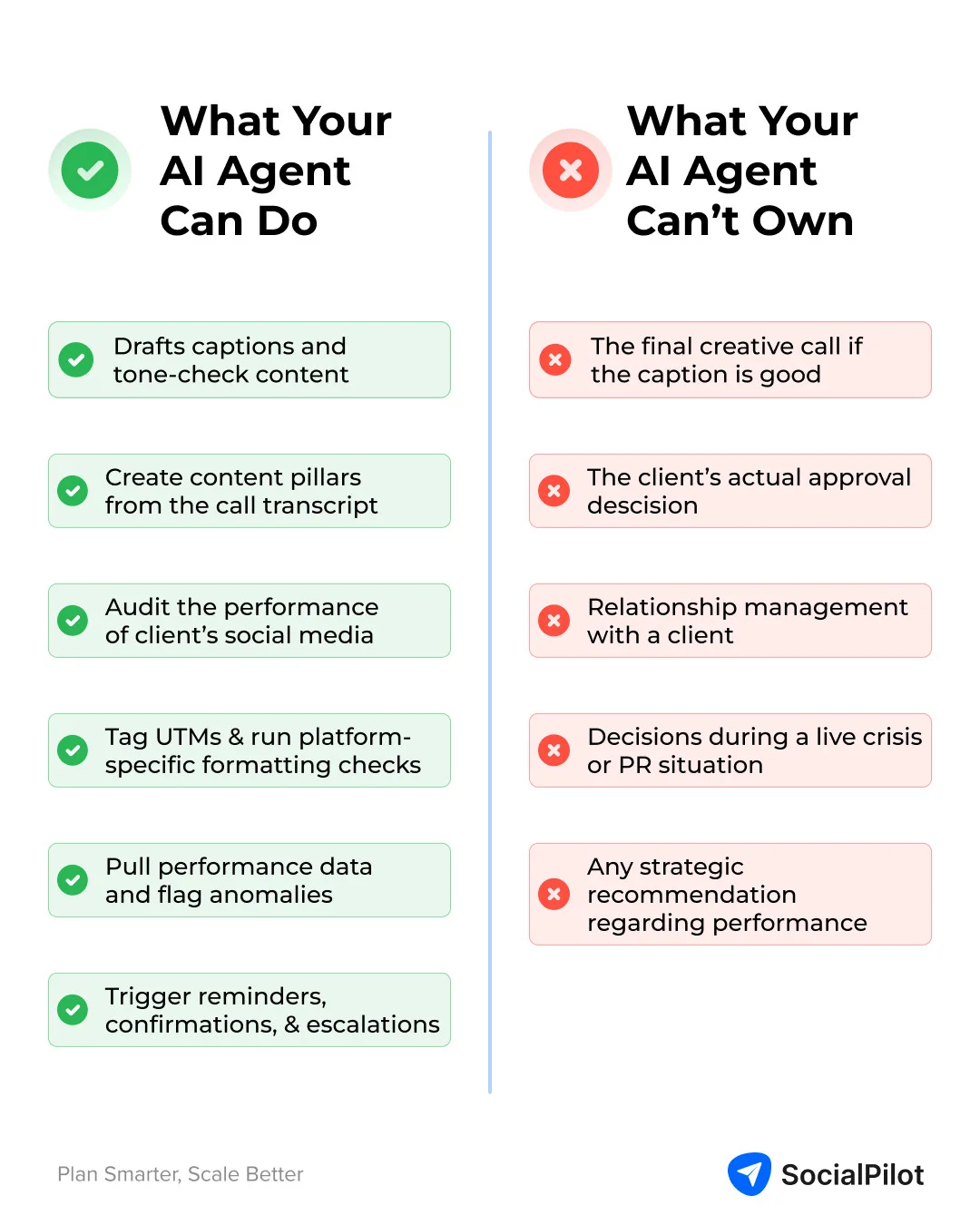
What Your AI Agent Can Do
Your AI agent can draft captions from a brief and tone check them against stored brand guidelines. It can turn a messy kickoff call transcript into a first draft of content pillars so a person is editing instead of starting from scratch. It can audit a client existing social presence and summarize posting cadence and past performance. It can tag tracking parameters on every post and run platform specific formatting checks before content goes live. It can pull raw performance data from analytics tools, write the narrative, and flag anomalies. It can trigger reminders, confirmations, and escalations at each step of a workflow and compile handover documents when a client leaves.
What Your AI Agent Cannot Own
Your AI agent cannot make the final creative call on whether a caption is actually good, not just technically on brand. It cannot make the client approval decision, since that call belongs to them. It cannot handle relationship management with a client or any conversation about results. It cannot make decisions during a live crisis or a real public relations situation. It cannot provide the strategic recommendation that comes out of a performance conversation.
Statistics show that a majority of social media users are now comfortable with brands relying on AI to deliver faster and more personalized care. This means the resistance you may be picturing is smaller than it feels. The connector making all of this possible is the Model Context Protocol, which lets the AI agent read and act inside tools like Notion, Slack, and scheduling platforms directly.
1. Client Onboarding Workflow
Onboarding is usually the first of your agency processes to break down under volume. It is the one step you repeat with every new client while everything else about that client is still unfamiliar to your team. The steps include sending the asset collection form, setting up the client account, auditing their existing social presence, drafting content pillars based on the kickoff call, and building the first month calendar.
You can automate the asset collection form trigger the moment the contract is signed so nobody has to remember to send it manually. The AI agent watches for the signed contract update and fires the form automatically. You can have the AI scrape and summarize the client existing social presence, posting cadence, and recent performance into a one page audit. You can turn the kickoff call transcript into a first draft of content pillars so you are editing instead of starting from nothing. Feed the AI the raw recording or transcript and it pulls out the themes the client actually talked about.
What stays human includes the kickoff call itself and signing off on brand voice.
2. content creation and Approval Workflow
This workflow covers content your team creates and sends out for client sign off. The steps include pulling the brief from the content calendar, drafting captions per platform, tone checking against brand guidelines, internal review by a second person, routing to the client for approval, and moving to the scheduling queue.
You can automate the drafting of captions straight from the brief. The AI reads the brief and writes a first version in the format each platform needs, which a person then edits instead of writing from scratch. You can automate tone checking every draft against the brand guidelines. Since those guidelines live in the same workspace the AI has access to, it can flag a caption that drifts from the client voice before an internal reviewer ever sees it.
You can trigger the approval routing automatically the moment internal review is marked complete. The AI watches for that status change and routes the post straight to the client so nobody has to remember to forward it. What stays human includes the final creative review and the client actual approval decision.
3. Batch Scheduling and Publishing Workflow
This is the workflow most people actually mean when they ask how to automate social media posts. It has the clearest and fastest payoff because every step after content approval is mechanical. The steps include adding tracking parameters to every post, formatting for each platform, bulk scheduling across every client account, and final human review before publication.
You can automate tracking parameter tagging on every post so nobody forgets and client traffic goes untracked. The AI appends the correct campaign parameters to every link automatically using the naming convention you set once. You can automate platform specific formatting checks so a caption written for LinkedIn does not go out on Instagram unedited. The AI checks copy length, hashtag placement, and image specs against each platform requirements before anything moves into the queue.
You can automate bulk scheduling across every client account at once instead of one platform at a time. Once formatting is confirmed, the AI schedules everything in one pass. What stays human includes one final look at the schedule before the publish window opens, since a mistake at this stage reaches the client audience directly.
4. Client Reporting Workflow
Reporting is the workflow most agencies already know is a manual mess. It touches the most tools before it ever reaches a client inbox. The steps include pulling performance data from analytics platforms, summarizing performance against client specific KPIs, flagging anomalies, generating the formatted report from your template, and delivering it on schedule.
You can automate the pulling of raw data from analytics tools directly instead of logging into separate dashboards yourself. The AI connects through reporting APIs and pulls exactly the metrics your report template needs. You can automate the writing of the performance narrative and flagging of anomalies worth a second look. The AI compares current numbers against the client usual range and calls out anything that moved more than expected.
You can automate the generation of the report and delivery on the schedule you set once. The AI assembles the report and pings you the moment it is ready to review before it goes out. What stays human includes the actual conversation with the client about what the numbers mean and any strategic recommendation that comes out of that conversation.
5. The Client Side Workflow Most Agencies Never Build
The content creation workflow covers what happens after your team makes something. This one covers the opposite direction. What happens when the client is the one who owes you something. Almost no agency documents it, which is exactly why it becomes the biggest bottleneck nobody planned for. The steps include client submission of assets through one defined channel, agency review against the original brief, one feedback round with a defined turnaround window, client approval of the final version, and handoff to the content team for scheduling.
You can automate a confirmation the moment assets come in through that channel. The AI watches the submission channel and sends an automatic acknowledgment so the client knows their file was received. You can automate a turnaround reminder if there is no response inside the window you set. A scheduled check runs against every open request stored deadline, and the moment one is still unanswered, the AI nudges the right person. You can route an escalation if a deadline gets missed entirely.
What stays human includes the actual relationship management with the client and any decision about an urgent last minute change.
6. Client Offboarding Workflow
Offboarding gets skipped in almost every agency documentation right up until a client leaves on bad terms and nobody remembers which accounts they still have access to. The steps include logging the end date, auditing every active account and every piece of access tied to the client, packaging and handing over all client assets, generating the final performance report, revoking every piece of account access, and closing the client workspace.
You can automate the access audit the moment notice comes in. The AI checks every connected tool and account against your master client list and flags anything still open that should not be. You can compile the full asset handover package. The AI gathers everything stored in that client workspace into one folder instead of you hunting through months of files by hand. You can draft the final report pulling the same performance data used in the regular reporting workflow and turning it into a closing summary the client can keep.
What stays human includes the exit conversation and handing off the relationship if the client is moving to someone new on your team.
Why Most Procedures Fail
Every workflow above only works if the procedure behind it is actually good. Mostly they are not. Procedures assume humans follow instructions. They do not. They skim. They skip. They guess. Here are the three ways procedures usually break.
First, the procedure tries to do a person job. Something like write an engaging caption is not a step. It is a wish. The real doable steps are draft, tone check, and review. Whether the caption is actually good is still someone call. No document can make that call for them. Fix it by keeping only the mechanical steps in the procedure and leaving the judgment to a person.
Second, nobody owns it so it goes stale. If no one person is responsible for a procedure, nobody updates it when a tool changes or a platform adds a new feature. Your team notices and quietly stops trusting it. Fix it by giving every procedure one clear owner who updates it the moment the process changes.
Third, it lives somewhere nobody opens. A great procedure buried in a wiki nobody visits helps less than a rough one sitting inside the tool your team already uses every day. Fix it by connecting the procedure to the actual workflow so it runs on its own instead of waiting for someone to remember it.
Automation Makes Your Procedures Work
Automation does not replace your procedures. It is what actually makes them run. Your brand guidelines, your operations playbook, and the procedures underneath them only work once something is doing the mechanical parts for you instead of leaving it to memory. None of this replaces your judgment, your relationship with the client, or the calls only you can make in a real crisis. It just stops all of that from running through you by default.
For those looking to build a career around these skills, understanding how to leverage AI for automation is becoming a core competency. Our affiliate marketing course, combined with training from industry experts like Nehme Sbeiti on website design, search engine optimization, and digital marketing services, provides the foundation needed to implement these systems effectively.
Start by automating that one workflow that is taking most of your time. The future of agency work is not about working harder. It is about designing systems that handle the repetitive tasks so you can focus on the strategic thinking that truly moves your clients forward. The procedures you already wrote finally have a system behind them instead of just being a document that describes them.

