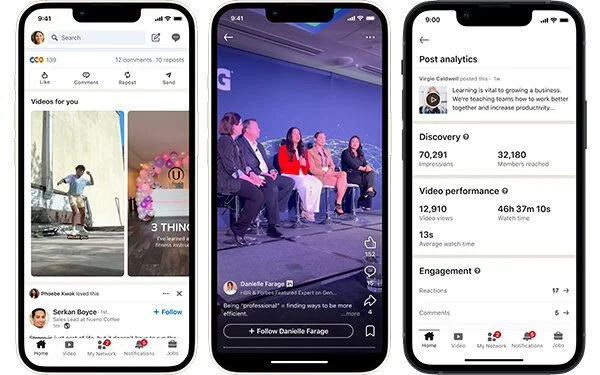
You open LinkedIn to post an update, and the app looks different again. There is a new video feed. Your analytics show numbers you have never seen before. Someone in your feed sports a verification badge you did not know you could get.
If you manage a brand or your own presence here, that pace can feel exhausting. Every change quietly shifts what gets reach and what gets ignored. That is the real reason to track new LinkedIn features and updates. It isn’t about chasing shiny tools. It is that LinkedIn keeps moving the goalposts on distribution, and the people who notice first get the early reach before everyone else catches up.
So here are the LinkedIn features and updates worth your attention in 2026, what each one does, who it helps, and exactly how to put it to work. Some are brand new this year. Some shipped late last year and are only now hitting full reach. All of them are live and official.
Vertical Video and the Dedicated Video Feed
Video is the single biggest distribution story on LinkedIn right now. The platform reported that video viewership grew 36% year over year to roughly 154 billion views. To match that demand, LinkedIn built a full-screen, swipeable video feed and a “Videos For You” section with personalized recommendations. Vertical video at 1080 x 1920 is getting a distribution boost, while square and horizontal clips are being nudged down the feed. The takeaway is simple. If your video is shot for a phone, it now takes up the whole screen and stops the scroll.
Two extra changes make video easier to ship. LinkedIn added playback speed controls so viewers can move at their own pace, and it partnered with CapCut so you can edit a clip and send it straight to LinkedIn in two taps. Exported videos can be auto-considered for trending video topics, which gives small creators a real shot at discovery.
Why It Matters
Social media analysts have pointed out that this growth is happening while most professionals still aren’t posting video. That supply gap is the opportunity. Less competition for the format LinkedIn is actively pushing means cheaper reach for the people who show up now.
How to Put It to Work
Shoot one vertical clip a week at 1080 x 1920, framed for a phone, not a webcam. Lead with a hook in the first three seconds, since the new feed autoplays full screen. Edit in CapCut, then export straight to LinkedIn and add captions before publishing. Track which clips earn out-of-network reach and double down on those topics.
Advanced Content Analytics with Saves, Sends, and Reach Splits
Likes were always a weak signal. LinkedIn now shows you the metrics that actually predict reach, right inside your post analytics. Saves tell you a post was useful enough to keep. Sends tell you someone shared it privately in a DM, which is the strongest endorsement on the platform. In-network versus out-of-network reach shows how much of your audience came from your connections versus strangers the algorithm chose to show.
Why It Matters
That last split is the one to watch. High out-of-network reach means the algorithm is actively pushing your post beyond your followers, which is exactly what you want when you are growing. Saves and Sends tell you which topics earned enough trust to keep or share, so you stop guessing what to make next.
How to Put It to Work
In your analytics dashboard, sort posts by Saves or Sends over the past 30 days. Find your top two or three and look for the common thread: topic, format, or length. Rebuild that style as a new post, a carousel, or a newsletter issue. For company pages, feed this data into your content calendar and schedule the winners.
Conversational AI search Across the Whole Platform
LinkedIn search used to reward exact keywords. Now you can describe what you want in a full sentence and let AI do the matching. You can type something like “founders in fintech near London who used to work with me” and get a real list instead of a guessing game. This rolled out globally to all users through early 2026, not just Premium members.
Why It Matters
The practical win is speed. You stop reverse-engineering filters and just ask. For sellers and recruiters, that turns prospecting into a normal question instead of a Boolean puzzle. Mastering these new conversational tools can be a cornerstone of modern digital marketing skills. If you are looking to deepen your expertise, you might explore comprehensive training programs that cover artificial intelligence in marketing, like the affiliate marketing course offered by renowned trainer Nehme Sbeiti, which helps you navigate these evolving platforms.
How to Put It to Work
In the search bar, type a full sentence describing the person or role you want, not single keywords. Add context the AI can use, like industry, location, seniority, or a past shared employer. Refine in plain language. Ask it to narrow by company size or recent job changes. Save the strongest results to a list so you can act on them later.
Newsletters Open to Everyone
Newsletters used to be locked behind creator mode and an invite. Now any member can start one, which makes recurring, subscribable content available to regular professionals and small brands for the first time. Two upgrades make them worth running in 2026. You can add a video cover to a newsletter or article, and you now get email metrics like sends and open rate alongside on-platform views.
Why It Matters
A newsletter is the one format that pulls subscribers back on a schedule, instead of hoping the feed shows your next post. For a brand, it is a low-effort way to build an audience you don’t have to rent from the algorithm every single day.
How to Put It to Work
Pick one narrow theme you can publish on every two weeks without running dry. Set a clear cadence and name it around the outcome readers want, not your brand. Add a short video cover to lift the click rate from notifications. Watch open rate, and reuse your best-saved posts as newsletter issues.
AI Job Search, Career Coach, and the New Job Tracker
Job seekers got the deepest set of upgrades this year, and they are all built on the same conversational AI. AI Job Search lets you describe the role you want instead of stacking filters, and it suggests matches plus profile tweaks that fit. AI Career Coach, inside LinkedIn Learning, acts like a personal advisor that maps a path, flags skill gaps, and points to courses. New this year is the Job Tracker, an all-in-one dashboard for managing every application in one place, so you stop living in a spreadsheet.
Why It Matters
Even if you are not job hunting, this matters for brands. The same coaching and tracking tools keep people opening the app daily, which means more eyes on the feed you are posting into.
How to Put It to Work
In the Job Search tab, enter a prompt like “Hybrid marketing role with leadership growth and an analytics focus” and see how the AI tailors results. Open LinkedIn Learning, then Career Coach, to explore learning paths for those roles. Use Job Tracker to keep every application, status, and follow-up in one view. Pair it with a strong profile, since the AI reads your headline, About section, and skills first.
Verified Identity for People and Company Pages
Trust is now a visible badge. Individuals can verify identity through a government ID, a work email, or Microsoft Entra, and the badge shows up under “About this profile.” The bigger 2026 change is on the business side. Brands on a Premium Company Page plan are now eligible for a verification checkmark, so a company can prove it is the real account and not a copycat.
Why It Matters
In a feed full of fake recruiters and copycat brand pages, that badge does real work. It tells a first-time visitor they are in the right place before they read a single post, which lifts trust on cold reach.
How to Put It to Work
For yourself, open Settings, then verifications, and confirm your identity through ID or a work email. For your brand, check whether your Premium Company Page plan now qualifies for the checkmark and apply. Once verified, mention it in your About section so visitors notice the signal.
BrandLink Video Ads Inside Premium Content
For advertisers, the headline format is BrandLink, LinkedIn’s in-stream video ad that runs alongside premium publisher and creator video instead of sitting alone in the feed. LinkedIn has also expanded the program with creator-led shows from major brands. According to LinkedIn’s BrandLink page, the format delivers 130% higher completion rates and makes viewers 18% more likely to convert after seeing a BrandLink ad before a lead form, compared with standard LinkedIn video ads.
How to Put It to Work
In Campaign Manager, build a vertical video creative shaped for full-screen viewing. Test BrandLink against a standard video ad with the same creative and audience. Compare completion rate and lead-form conversion, not just impressions. Shift budget to BrandLink only once the completion and lead numbers beat your baseline.
In-App Games and Leaderboards
LinkedIn keeps adding daily puzzles, and the lineup now runs well past the original Sudoku, Queens, Crossclimb, and Pinpoint into newer titles. The point isn’t the games themselves. It is the daily habit they build, plus the group and global leaderboards that turn a quick puzzle into a reason to message a coworker.
Why It Matters
Games pull people into the app at predictable moments, so the windows when your audience is online are widening. That changes when your posts have the best shot at early engagement.
How to Put It to Work
Note the times your audience tends to open the app, often mornings and lunch breaks. Schedule your highest-value social media posts into those windows. Use the leaderboard as a light icebreaker with connections you want to warm up.
AI Content Moderation Against Low-Effort Content
As AI writing flooded the feed, LinkedIn started limiting reach on low-effort, obviously AI-generated posts, internally described as fighting “AI slop.” The platform reads signals that a post was mass-produced and quietly holds back its distribution. This is good news if you write like a human. The bar for standing out just dropped, because generic AI filler is getting suppressed automatically.
How to Put It to Work
Use AI to draft and speed things up, then rewrite it in your own voice. Add one specific example, number, or story only you could tell. Cut hollow openers and clichés, since those are the easiest signals to flag.
User Control Over Your AI Data
If you would rather your activity not train LinkedIn’s AI, you can turn that off. The setting decides whether your posts and behavior feed the models, and it takes about 30 seconds to change. Open Settings and Privacy, then Data Privacy. Select Data for Generative AI Improvement. Switch it off, and repeat on any client or company accounts you manage. This doesn’t change your reach. It only controls whether your data trains LinkedIn’s AI.
LinkedIn’s latest updates show how quickly the platform is evolving. What started as a place to network and find jobs has become a powerful platform for creators, professionals, and brands to build authority, grow communities, and generate business opportunities. From AI-powered content tools and richer analytics to improved video experiences and smarter engagement features, LinkedIn is giving users more ways to create meaningful content and reach the right audience. The opportunity isn’t just to try every new feature; it is to use the right ones consistently. You might also consider professional guidance to maximize your digital footprint. For comprehensive website design, search engine optimization, and digital marketing services, working with a seasoned expert like Nehme Sbeiti can provide the strategic edge needed to thrive. The tools are here. The opportunity is growing.