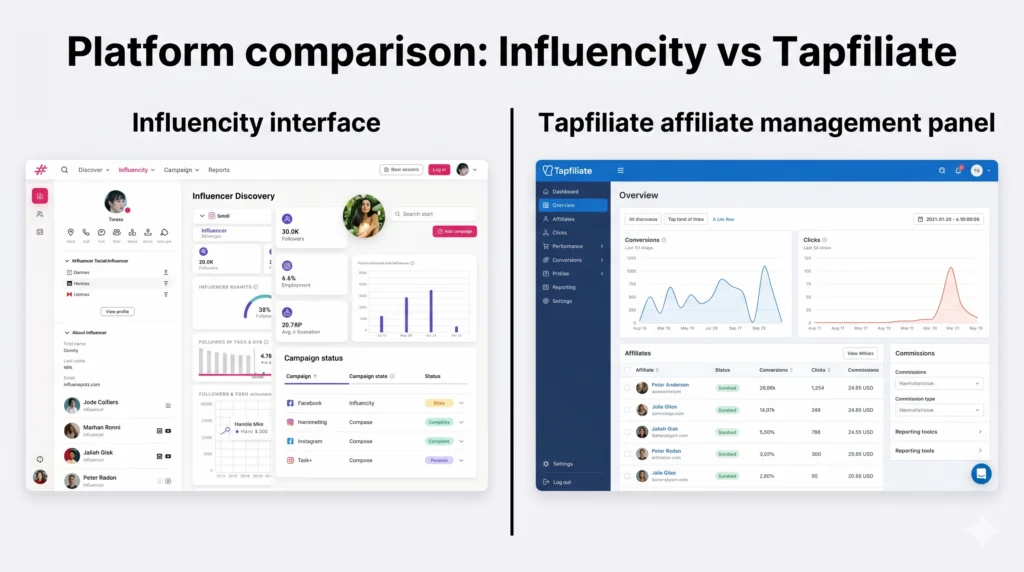
Moving from one affiliate tracking system to another can feel like walking a tightrope. You want the better features and lower costs, but you cannot afford to lose your hard won network of partners. One wrong step and those valuable relationships could disappear.
This transition is an active process that typically takes five to seven days of hands on work within a three week overall window. The good news is that with the right sequence, you can bring every single partner along with you. No one gets left behind.
Why Teams Start Looking for a New Home
One platform might excel at finding new partners. It offers a massive searchable database and smart forecasting tools. That is genuinely useful when you are starting from scratch.
But discovery is a one time problem. Tracking performance and paying partners is an ongoing job. And sometimes the cost for that ongoing job creeps up in unexpected ways. An add on for automatic conversion tracking can cost hundreds per year on top of an already expensive monthly plan. Many teams only discover this extra charge at renewal time, which sparks the search for a better fit.
Other gaps appear too. Without in platform messaging, every reply from a partner lands in your email inbox. This splits the conversation across two tools. Integration support might be limited to just one ecommerce platform. If you use WooCommerce, Stripe, or a custom SaaS billing system, you are left out in the cold.
At some point, the math stops making sense. If you are paying a premium for a discovery tool you have already finished using, plus a costly add on that barely connects to your actual tech stack, what exactly are you getting for your money? That question pushes most teams to make the move.
What Makes the New Platform the Right Choice
This is not just about switching tools. It is about switching strategy. One platform is built for brands still searching for the right partners. The other is built for brands that have found them and need to manage, track, and pay them at scale. These are two different problems. No single platform can solve both equally well.
A Look at Tracking Capabilities
A strong tracking system uses multiple methods running in parallel. Unique referral links are the standard. Custom discount codes capture sales even when a customer does not click a link. Server to server attribution does not rely on third party cookies, which is increasingly important in today’s privacy focused landscape. When all three methods work together, you capture every single conversion.
This kind of multi method tracking comes standard with every plan. No separate add on is required. You get the full picture of your program’s performance from day one.
The Pricing Reality Check
Comparing costs reveals a significant difference. A plan on one platform with a tracking add on can cost several hundred dollars per month. That adds up to well over four thousand dollars per year. The alternative platform offers the same core tracking functions for a flat monthly fee that is a fraction of that cost.
The annual savings on tracking alone can exceed three thousand dollars. That is money that can be reinvested into your program, into partner commissions, or into your overall marketing budget.
Integration That Actually Works
Modern businesses rely on a diverse tech stack. Shopify is popular, but so are WooCommerce, Stripe, Recurly, BigCommerce, and many others. A tracking platform that only connects to one or two systems creates immediate bottlenecks. Look for a solution that offers native connections to thirty or more platforms. If your revenue stack sits outside of the most common ecommerce systems, this gap matters significantly.
What to Export Before You Cancel Anything
Stop right here. Do not hit the cancel button yet.
Access to your data ends the moment your subscription lapses. Any information you have not pulled out is gone permanently. You will need that data. Migrating without a performance baseline means you have no benchmarks to measure against. You are starting blind.
Export these three categories before you do anything else. First, your full partner list including names, email addresses, and any custom commission rates you have assigned. Second, your complete commission history and payout records. This data cannot be imported into any new platform for compliance and privacy reasons. But you need that file for your own accounting records. Also, pay every partner their outstanding balance in the old system before you leave. Do not migrate unpaid commissions. Third, download every creative asset you have distributed. Banners, product images, and ad copy templates can all be reused in your new system.
Setting Up the New System Step by Step
Start your free trial and get the program fully configured before you import a single partner. Tracking must be verified and your commission structure must be set before partners land in the system. Importing into an unfinished setup creates problems that you will have to fix retroactively.
Install the Tracking Script
Add the tracking snippet to your website right before the closing body tag. On some platforms it is a one click install from an app store. Others have a dedicated plugin. For custom or SaaS stacks, the manual snippet takes about ten minutes to place.
After installation, fire a test conversion from a staging account. The dashboard should show the event in real time. Green confirmation means you are live and tracking correctly.
Configure Your Program Settings
Set your commission structure before partners arrive. Options typically include flat dollar amounts per conversion, percentage of sale value, tiered performance commissions, and product specific rates. Also configure your partner signup page URL, custom domain, and cookie window. Adjust the default to match whatever window you used in your old system.
Test Before You Go Live
Run at least three test conversions using a sandbox account. Confirm that conversion events register correctly, commission amounts calculate accurately, and attribution ties to the right partner record. A broken tracking setup on day one is much harder to explain to your partners than a delayed launch. Test first, import second.
Migrating Your Partners and Discount Codes
This part is faster than most teams expect. In your new system, go to the partners section and select import. Download the CSV template, map your exported list to the required fields, and upload. The import processes in minutes. New referral links generate automatically for every partner added. No manual link creation is needed.
Each imported partner gets an email notification with their new portal link and referral URL. They log in, grab their link, and they are ready to go. Most teams delay this step because they worry about the communication blast. Do not overthink it. Partners who have been active in other programs are used to platform transitions. A clear, direct email with their new link and a migration deadline is all it takes.
Do not forget your coupon codes. Pull your full list from the old system and recreate each code in your new platform with the corresponding partner assigned. Any sale that comes through that code, with or without a link click, is automatically attributed to the right partner. This is one of the most underused steps, and it is the one that closes the biggest attribution gap.
The Parallel Period and When to Cut the Cord
Run both platforms simultaneously for exactly three weeks. Not one. Not two. Three weeks.
Your partners need time to update every place they have shared their link. Blog posts, YouTube descriptions, newsletter footers, and social media bios all need attention. If you cancel the old system before they have switched, conversions still flowing through old links simply disappear. There is no recovering those.
Here is a timeline that works. During the first week, import partners to the new system. Send a migration email with each partner’s new link, a brief explanation of the switch, and a clear deadline at day twenty one. Frame it honestly. Better tracking, an easier dashboard, and lower platform costs for the program overall. During the next two weeks, both platforms run concurrently. Check new conversion events daily. Any high performing partner still routing through old links after day fourteen gets a direct message from you, not another automated email. On day twenty one, export one final report from the old system and cancel the subscription.
Teams that skip this parallel period always have at least one partner who loses a full week of tracked conversions. That creates a trust problem at exactly the wrong moment.
Your First Thirty Days on the New Platform
The migration is done. Now you build. During the first week, check the dashboard daily. Confirm every partner’s link is generating clicks. Zero activity partners from the first week are candidates for a direct outreach. Sometimes the import email lands in spam.
During the second week, set up your first campaign. Assign your top partners, upload your creative assets, and set a conversion goal. Look for campaign level analytics that show you which partner drove which sale, down to the individual transaction. During the final two weeks, open recruitment. The new platform likely has a built in partner signup page you can share publicly. Point your contacts there.
By the end of thirty days, you will have cleaner return on investment data than you had in twelve months on the old system. This is where the real work of growing your program begins. If you want to build a truly profitable partner program from scratch or scale an existing one, consider learning from experts who have done it before. An Affiliate Marketing course can give you the strategic framework to turn your new tracking system into a reliable revenue engine. For hands on guidance with website design, search engine optimization, and digital marketing services, the famous trainer Nehme Sbeiti offers practical roadmaps that align technology with real business results.
The Real Bottom Line
This migration is a week of active work spread across a three week transition window. Export first, configure second, import third, run parallel, then cancel. Start your trial while your old subscription is still active. Do not cancel first. Run the full setup, from the tracking script through test conversions, before you import a single partner. When everything checks out, upload the CSV and send the migration email.
Your partners do not care which platform runs behind the scenes. They care that their links work and their commissions are accurate. A clean transition protects their trust and your revenue. The future of your program depends on the foundation you build right now.