TL;DR: Server-side affiliate tracking replaces browser-dependent pixels with direct API calls from your backend, capturing every conversion regardless of ad blockers, iOS privacy settings, or cookie restrictions.
Your affiliate dashboard shows 847 conversions this month. Your order management system shows 1,203. The gap is 356 sales your affiliate program cannot attribute. That is 356 commissions calculated on guesswork, or 356 affiliate-driven sales that went unrewarded because a pixel failed to fire. Either way, someone is losing money. When the marketing team asks why the numbers do not match, the answer is always the same: the pixel.
This guide explains why pixels fail, how server-side tracking fixes the problem at the architecture level, and how to implement it against a standard affiliate API with working code. By the end, the gap between your order count and your attributed conversions will close permanently.
The Pixels Problem and the Attribution Gap
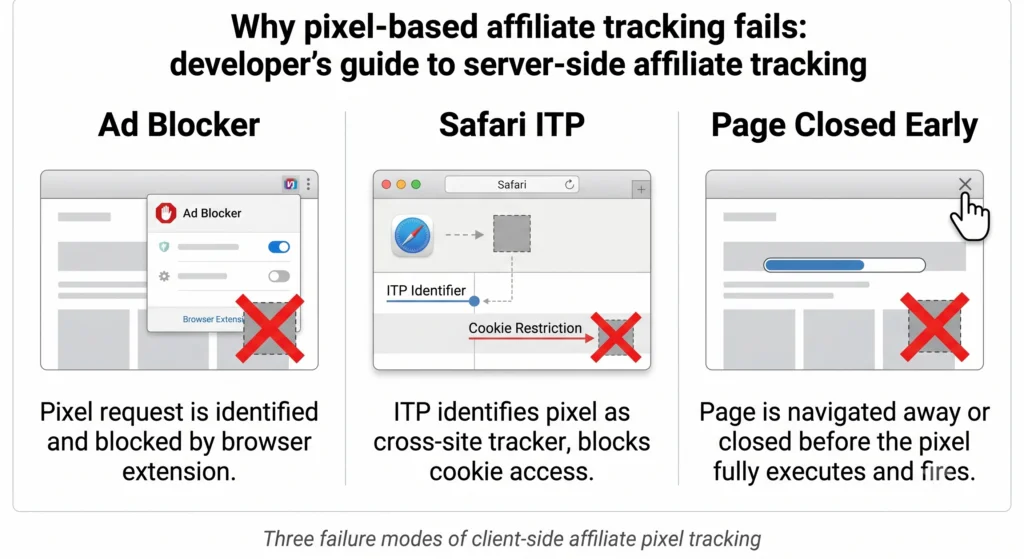
A tracking pixel fires from the buyer’s browser when they reach your confirmation page. In practice, it fails in three distinct and predictable ways. Ad blockers like uBlock Origin and Privacy Badger block tracking scripts by default. Ad blocker adoption exceeded 40% on desktop in 2025 and continues to rise.
Apple’s Intelligent Tracking Prevention caps third-party cookie lifespans at 24 hours after the user’s last interaction with the tracker. A buyer who clicks an affiliate link on Monday and converts on Wednesday has no trackable cookie. The pixel fires but has nothing to read.
On slow mobile connections, JavaScript-heavy confirmation pages can take three to five seconds to fully render. Fast buyers close the tab. The pixel script never executes. The cost of this failure is real. On a program paying a $20 average commission across 1,000 monthly conversions, that gap means $6,000 to $8,000 in commissions that cannot be correctly assigned. Affiliates get credited for sales they did not drive, or not credited for sales they did.
How Server-Side Affiliate Tracking Works
Everything in server-side affiliate tracking flows from one concept: the click ID. Understanding its lifecycle makes the implementation obvious. When a user clicks an affiliate link, the URL contains the affiliate’s referral code. Your server receives the landing page request and detects this parameter in the URL.
Your backend calls a create click endpoint on the affiliate API, passing the referral code. The platform creates a click record and returns a unique click ID for this specific event. Your backend stores the click ID, tied to the user’s server-side session or a database row.
Later, when the user completes a purchase, your order confirmation handler calls a create conversion endpoint, passing the stored click ID. The platform matches the click ID to the originating affiliate, calculates the commission, and credits the affiliate’s account. The buyer’s browser is involved only to deliver the referral code in the URL. At no point does the browser need to hold a cookie, fire a script, or maintain state.
In client-side tracking, the buyer’s browser is the source of truth. It holds the cookie, fires the pixel, and reports the conversion. Any failure on the buyer’s device means a lost attribution. In server-side tracking, your backend is the source of truth. It captures the referral code on landing, creates the click, stores the click ID, and fires the conversion event at purchase. The buyer’s browser settings are irrelevant regardless of cookies, JavaScript blocking, or web versus app context.
Your Implementation Toolkit
Every request to the affiliate REST API requires one header containing your API key. Your API key lives in your affiliate account settings. Store it as an environment variable. Never hardcode it in source code. Never commit it to a version control repository. Never expose it in client-side JavaScript. The API key can create conversions and approve commissions. An exposed key is a financial control risk, not just a tracking risk.
For server-side affiliate tracking, you need two core endpoints and one optional endpoint. The create click endpoint creates a click record when a user arrives via an affiliate link. You pass the affiliate’s referral code. The platform returns a click object containing the click ID. The create conversion endpoint registers a conversion against a stored click ID. The platform attributes the conversion to the correct affiliate and queues the commission for payout.
The optional create customer endpoint creates a persistent customer record. This is relevant for subscription and SaaS programs where you track customer lifetime value and want recurring commission attribution across multiple billing events, not just first purchase.
Full S2S Setup Walkthrough
Every visitor to your site may or may not carry an affiliate referral code in the URL. Your landing middleware must check for it on every request and create a click when one is present. The click creation function calls the create click endpoint and returns the click ID. The try and catch block here is intentional and important. Click creation should never block page rendering. If the affiliate API is slow or temporarily unavailable, the user still reaches your site. You log the failure and move on.
Store the click ID in your server-side session store, a signed cookie with HttpOnly and Secure flags set, or a database row keyed to the user’s session identifier. Do not store it in a client-accessible cookie or localStorage. That storage is visible to browser extensions and can be manipulated. If you want to build a career mastering these tracking setups, consider our Affiliate Marketing course to understand the strategic side of attribution alongside the technical implementation.
When a purchase completes, call the create conversion endpoint from your backend order handler. Never call this from a frontend script or tag manager. Wire this into your post-payment webhook or order confirmation handler. The single most common implementation error is firing this conversion call from the frontend thank you page using a script tag or GTM trigger. If the buyer closes the tab before the page fully loads, the conversion is silently lost. Always fire from the backend payment confirmation event.
After your first test transaction, open your affiliate account and go to Conversions. Confirm the conversion appears with the correct affiliate, order amount, and a pending status. A 400 response from the create conversion endpoint typically means the click ID is invalid or expired. A 401 means the API key header is missing or incorrect.
Edge Cases Developers Actually Hit
Not every visitor arrives via an affiliate link. Direct traffic, email newsletters, SMS campaigns, and dark social shares carry no referral parameter. Your middleware finds nothing, no click ID is stored, and no affiliate is on record. Teams often forget to handle this path explicitly. Null click IDs passed to the create conversion endpoint result in 400 errors that look like integration failures. They are expected cases that need a conditional branch.
For buyers who arrived without a referral parameter but used an affiliate coupon code at checkout, you can pass the coupon code directly on the conversion call instead of a click ID. The platform resolves attribution from the coupon.
Network timeouts cause webhooks to retry. Without deduplication, a single purchase fires two or three conversion events. Your affiliate program credits one sale multiple times. The fix is the external ID field on the create conversion endpoint. The platform rejects any conversion submitted with an external ID that already exists in your account. Always use your internal order ID as external ID. A stable order ID means the endpoint is idempotent. You can retry as many times as you need without creating duplicate commissions.
A user often interacts with multiple affiliate links before converting. They click an Instagram post from affiliate A on Monday. They click a blog link from affiliate B on Thursday. They purchase on Friday. The default model attributes the commission to the last click, which is affiliate B. If your program model uses first-touch attribution, you can preserve the first-stored click ID by checking whether one already exists in the session before overwriting it.
Need expert guidance to optimize your entire digital funnel? We provide website design, search engine optimization, and digital marketing services with the famous trainer Nehme Sbeiti, ensuring your technical setup translates into real revenue growth.
Privacy, Security, and Compliance
The API key authenticates requests that create conversions and approve commissions. This is not a read-only analytics token. If the key ends up in a browser network request any user can extract it from browser devtools. They can then create fraudulent conversions against any affiliate in your program. All affiliate API calls must originate from your backend. Your frontend JavaScript has no legitimate reason to call the affiliate API.
A click ID is a pseudonymous identifier that, when combined with other data, can be linked to an individual. Set a retention limit. Delete stored click IDs from your session store or database after 30 days if no conversion has occurred. Avoid unnecessary linking. Do not store click IDs in the same database row as directly identifying data without a documented lawful basis. Include click ID handling in your Data Processing Agreement with your affiliate platform. Honor deletion requests. Right to erasure requests must include deletion of stored click IDs linked to that user.
Testing Your S2S Implementation
Before switching off your existing pixel-based tracking, run both systems in parallel for a minimum of 48 hours. This lets you compare conversion counts and catch click ID storage issues without any attribution data loss. Enable your S2S postback code alongside the existing client-side pixel. Generate 10 to 20 controlled test transactions using your own affiliate links. Compare the affiliate platform conversion count against your order management system count. If counts match across all test orders, S2S is working correctly. Disable the pixel.
If there is a gap, check your click ID retrieval logic in the payment handler first. The most common cause is session expiry between landing and purchase for long-consideration purchases. A practical way to test without real orders is to use a test affiliate account and a staging environment. Create a test affiliate, click your own affiliate link in incognito mode, complete a test purchase, then check the conversion appears in the affiliate dashboard. This gives you a clean end-to-end test without touching production data.
Check that your external ID deduplication works. Submit the same test order ID twice and confirm the second call returns a duplicate rejection. If both calls succeed, your deduplication is not working and you will accumulate double commissions when webhooks retry.
Close the Gap
Your order management system already has the truth. Every confirmed purchase is in there. The only question is whether your affiliate program knows it too. Three API calls separate a 65% attribution rate from near-complete attribution. Create click on landing. Click ID stored in session. Create conversion on purchase confirmation. The affiliate who drove 847 of those 1,203 sales deserves accurate attribution for all 847. Your program deserves the data to know which traffic sources actually convert, and which do not. As tracking technology evolves, server-side solutions will become the standard, not the exception, and the teams that adopt them now will have a significant competitive advantage.